
Expert Summary
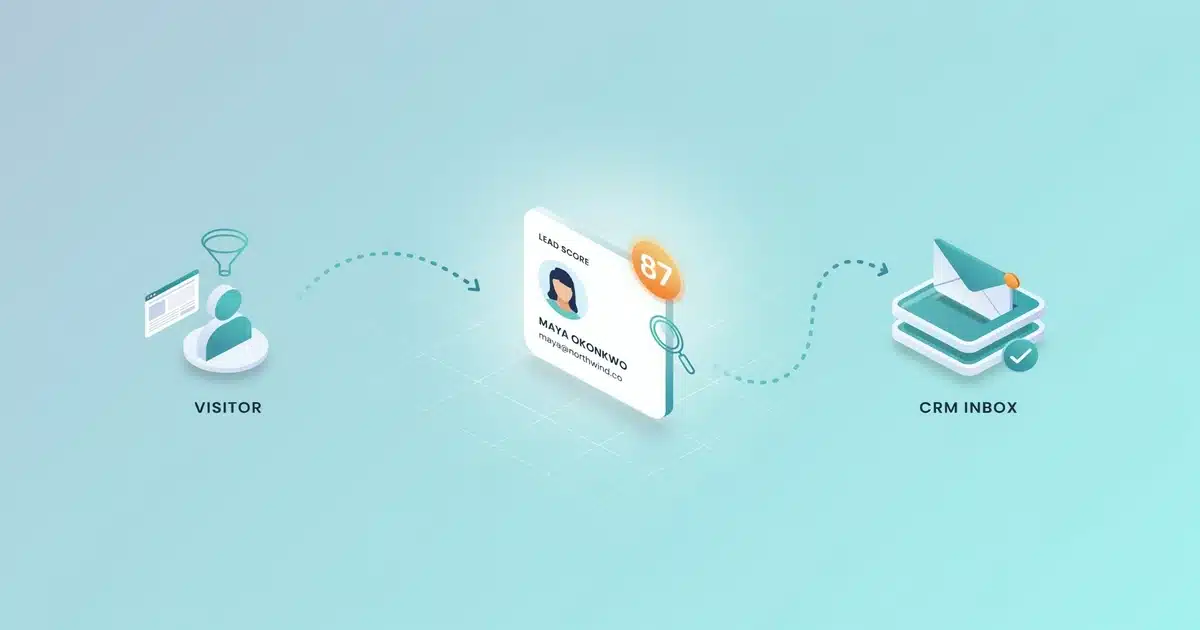
- Lead gen software runs on a six-step mechanism: attract, capture, enrich, score, route, and nurture.
- Lead scoring combines two signal types — fit (job title, company size) and behavior (page visits, email opens).
- Pricing ranges from free chatbot/email tiers up to $25–$90 per user/month for CRMs with scoring; sales intelligence tools are typically custom-quoted.
- The MQL-to-SQL handoff is where most scoring rules matter most, and where beginner setups most often go wrong.
- AI-powered predictive scoring and AI-drafted outreach are now standard in many mid-tier 2026 platforms, not premium add-ons.
That one paragraph above covers the mechanics. But if you’ve never used this kind of software before, “capture, score, route” probably raises more questions than it answers. Let’s slow down and walk through what’s actually happening behind the scenes, step by step, in plain English.
What Is Lead Generation Software, Exactly?
Before this category of software existed, lead generation was a manual grind: cold calling from a phone book, buying purchased contact lists, or having a rep comb through LinkedIn one profile at a time. Lead generation software replaces — or dramatically speeds up — that manual work using forms, tracking pixels, email sequences, and scoring rules. If you’re still getting familiar with lead generation as a strategy rather than the software behind it, our complete guide to what lead generation is covers the fundamentals first.
How Lead Generation Software Actually Works: The Step-by-Step Mechanics
This is the part most guides skip over or gloss with vague phrases like “it automates your funnel.” Here’s what’s really happening, stage by stage.
Attracting Traffic
Before software can generate a lead, it needs someone to generate a lead from. That traffic typically arrives through SEO-optimized content, paid ads, social media, referral links, or email campaigns. The software’s job starts once a visitor arrives — it’s not a substitute for having a marketing channel that brings people to your site in the first place.
Capturing Contact Information
Once a visitor is on your site, the software turns an anonymous visitor into a named contact through web forms, gated content, chatbots that collect an email mid-conversation, or tracking scripts that match anonymous visits to known companies using IP or firmographic data.
Enriching the Data
A raw email address isn’t very useful on its own. Most platforms automatically enrich a new contact with job title, company size, industry, location, and sometimes tech stack — pulled from public sources or third-party databases — so a rep can understand who they’re talking to immediately.
Scoring the Lead
Lead scoring assigns a numeric value to each contact based on two signal types: fit signals (does this person match your ideal customer profile?) and behavior signals (how engaged are they — pages visited, emails opened, demo requested?). A contact who fits your target profile and has visited your pricing page three times scores far higher than someone who downloaded one ebook and never returned.
Routing and Assignment
Once a lead crosses a scoring threshold, the software automatically routes it to a specific sales rep — often by territory or account ownership — or into a nurture sequence if it’s not quite ready. This typically happens through direct CRM integration, so the lead appears in a rep’s queue without manual data entry.
Nurturing (For Leads That Aren’t Ready Yet)
Not every lead is ready to talk to sales the moment they’re captured. For these contacts, the software triggers automated nurture sequences — emails, retargeting ads, or content recommendations — designed to build trust and move the contact closer to a buying decision over time.
During hands-on testing across several platforms in this category, the biggest practical difference shows up at capture: form-based tools only catch people who actively fill something out, while visitor-identification tools can surface company-level leads even when nobody submits a form.
Types of Lead Generation Software
Lead generation isn’t one single tool category — it’s a handful of overlapping tool types, each handling a different piece of the process. That mirrors the strategy side too: if you want to see how these tools map onto the broader types of lead generation a business can run, that guide breaks down the channels. Here’s how the software itself splits up:
📊
✉️
🗂️
💬
🔍
📱
💡
AI-powered features are increasingly standard rather than a premium add-on in 2026. Predictive lead scoring, AI-drafted outreach emails, and conversational AI chatbots that qualify leads without a human writing the script are now built into many mid-tier plans — worth checking for specifically, since it can meaningfully cut manual setup time. For a plain-English breakdown of what’s happening behind these features, see how AI marketing tools actually work.
What Day-to-Day Use Actually Looks Like
On the marketing side, day-to-day work usually means reviewing which forms or pages are converting, adjusting a nurture email sequence, and checking which lead sources are producing the highest scores. On the sales side, it typically means opening a queue of routed leads each morning, sorted by score, and working through them in priority order. Simple chatbot and email platforms are usually usable within a day, while full sales intelligence or marketing automation suites can take a few weeks to configure properly — particularly scoring rules and CRM field mapping.
A Quick Glossary for Beginners
Pricing: What Beginners Should Actually Expect
Pricing in this category varies widely depending on which piece of the puzzle you’re buying:
| Chatbot / Live Chat Tools | Free–$50/month — free tiers are often usable for very small sites |
|---|---|
| Email Marketing Platforms | Free–$35/month — pricing usually scales with contact list size |
| CRM with Lead Scoring | $25–$90/user/month — per-seat pricing adds up fast on larger teams |
| Sales Intelligence Platforms | Custom/enterprise pricing — often quote-based, built for larger sales teams |
Pros and Cons of Lead Generation Software
- Saves significant manual prospecting time
- Surfaces leads a human might miss, like site visitors who never fill a form
- Keeps sales and marketing working from the same data
- Enables consistent, repeatable follow-up via automation
- Provides reporting to see what’s actually converting
- Setup and integration can take real effort upfront
- Poorly configured scoring rules can bury good leads
- Per-seat or per-contact pricing scales with growth, sometimes unpredictably
- Over-automated nurture sequences can feel impersonal if not written carefully
- Data enrichment quality varies significantly between vendors
Who Should Use Lead Generation Software?
🏢
Perfect Fit
Getting consistent website traffic but relying on a spreadsheet to track follow-up.
📈
Perfect Fit
Needs to prove which channels are producing sales-ready leads, not just clicks.
🚫
Not Ideal Yet
Entirely relationship- and referral-driven, with no digital front door for software to plug into.
This is the part vendor-written guides tend to skip, since it’s not in their interest to tell you when not to buy. There’s also a middle scenario worth naming: businesses with decent traffic but no defined follow-up process at all. If leads are arriving but nobody has a consistent system for responding, software alone won’t fix that — automating a broken process just means you get to watch it fail faster, with better reporting.
How to Get Started with Lead Generation Software
The steps below apply regardless of which platform you pick, but with AI-powered options now the default rather than the exception, choosing the right one takes a bit more thought. Our guide on how to choose the right AI tool for your business walks through the evaluation criteria if you want to slow down on that decision before committing.
Define Your Ideal Customer Profile
Do this before you touch any software — scoring and targeting only work if you know who you’re actually trying to reach.
Pick One Entry Point
A form, chatbot, or gated content offer — rather than trying to build out every channel at once.
Connect It to a CRM
Even a free one, so captured leads don’t sit in a spreadsheet disconnected from follow-up.
Set a Basic Scoring Rule
Even something simple like “visited pricing page = high priority,” to start separating warm leads from cold ones.
Build One Nurture Sequence
For leads that aren’t ready yet, so no contact falls through the cracks while they’re still deciding.
Review Performance Monthly
Adjust your scoring thresholds as you learn what actually correlates with a closed sale.
Real User Feedback: What People Actually Say
Across G2 and Capterra reviews of tools in this category, a consistent pattern shows up: users praise the time saved on manual prospecting and the visibility into which leads are actually engaged, but frequently flag setup complexity and integration friction with existing CRMs as the most common early frustration. Reviewers also note that lead scoring is only as good as the rules a team configures — several call out that poorly tuned scoring initially buried good leads until they adjusted the criteria.
A second recurring theme is data quality: enrichment accuracy varies noticeably between vendors, and users on smaller plans sometimes report stale or incomplete records for smaller companies. This matters more for B2B-focused tools relying on firmographic data than for simpler form-and-chatbot tools, where contact information comes directly from the visitor.
A third theme worth flagging for beginners: reviewers coming from a fully manual process report the biggest satisfaction gains, while teams switching between two automated platforms report more modest improvements — often citing migration effort as the main downside. The return on switching tools is usually smaller than the return on adopting your first one.
Key Takeaways
- Lead gen software runs on six steps: attract, capture, enrich, score, route, nurture.
- Start with one capture channel and a basic CRM connection before layering in automation.
- Poorly tuned scoring rules are the most common early setup mistake.
- Pricing scales from free tools to $25–$90/user/month for scoring-enabled CRMs.
- AI-powered scoring and outreach are now standard in most 2026 mid-tier plans.
Final Verdict
Lead generation software isn’t complicated once you see the six-step mechanism underneath it: attract traffic, capture contact details, enrich the data, score the lead, route it, and nurture whoever isn’t ready yet. What varies between platforms is how well each step is executed — and how much manual configuration it takes to get there.
For most beginners, the right move isn’t buying the most feature-rich platform on the market. It’s starting with one capture method and a basic CRM connection, proving the process works with your actual traffic, and layering in scoring and automation once you have enough volume to justify it.
Frequently Asked Questions
What is lead generation software?
How does lead generation software work?
What are the different types of lead generation software?
What’s the difference between inbound and outbound lead generation tools?
Is lead generation software worth it for a small business?
How much does lead generation software cost?
What’s the difference between an MQL and an SQL?
Can lead generation software integrate with a CRM?
I’m Shamim Sarker, founder of SoftwareAdvisorHub.com — an independent software review platform built after 8+ years of hands-on SaaS testing. I never accept payment for positive reviews, and I always disclose affiliate relationships upfront.
My goal: Help you find the right software without wasting money on the wrong one.
Areas of Expertise: SEO Tools · Email Marketing · AI Writing Tools · Ecommerce Platforms · CRM Software · Project Management · Analytics
Every review is based on real hands-on testing — no paid placements, no vendor influence. Affiliate links are always disclosed.